
When discussing project automation, the conversation often starts with tools. Which platform should be selected? What systems should be integrated? What processes can be automated? In my experience, however, successful automation does not begin with technology. It begins with people and a shared way of working on projects.
Before automating tasks, reminders, reports, or decision logs, it is essential to understand how a project actually operates in day-to-day practice. Who makes the decisions? Where is information recorded? At what stage do tasks become delayed? What does the project manager have to compile manually week after week? And do all the people involved in the project truly share the same understanding of how the project should be managed?
This becomes even more important today, as artificial intelligence brings new opportunities to project management. AI can help summarize meetings, compile project status updates, identify potential risks, and prepare reports. However, if the project's core processes are unclear, AI will not fix them automatically. In fact, it may simply make existing inefficiencies more visible. For this reason, project automation should first be viewed as the development of shared ways of working, and only afterwards as a technical solution. When everyone involved understands how the project progresses, what information is needed, and how it will be used, automation becomes much easier to implement.
This article first introduces the fundamentals of reporting automation, the available tools, and their different use cases. Finally, I share my perspective on how organizations should approach reporting automation in practice, particularly in the age of artificial intelligence.
Tanja Karonen
Key Takeaways
- Automation reduces repetitive work, improves accuracy, and strengthens collaboration.
- Success depends on process clarity, documentation, and alignment with project objectives.
- Tools must be matched to each project stage, from planning to monitoring.
- Automation is continuous. Long‑term value requires governance and improvement.
What is Project Automation?
Project automation refers to the use of technology — digital workflows, rule‑based triggers, and AI‑driven logic — to execute recurring project tasks with minimal manual intervention. Its purpose is not simply to replace human effort but to make projects faster, more predictable, and easier to scale.
Instead of relying on manual updates, follow‑ups, or scattered spreadsheets, automation ensures tasks move seamlessly from one phase to the next. This includes automated task routing, conditional logic, scheduled reminders, and AI‑generated summaries. When applied to well‑defined processes, automation reduces errors, improves throughput, and frees employees to focus on higher‑value work
What Essentials for Efficient Project Automations
For automation to deliver real value, several essentials must be in place:
- Process clarity: Automating unclear or unstable workflows only amplifies inefficiency. Documentation of roles, rules, inputs, and outputs is critical.
- Defined objectives: Clear goals—such as reducing errors, improving speed, or freeing capacity—keep automation focused and measurable.
- Scalability and governance: Automation must be monitored, maintained, and adapted as business needs evolve. Strong governance prevents “black box” workflows.
- User adoption: Even the best automation fails if teams don’t use it. Training, transparency, and alignment with daily habits ensure engagement.
- Simplicity: Overcomplicated workflows reduce efficiency. Automation should streamline, not add complexity.
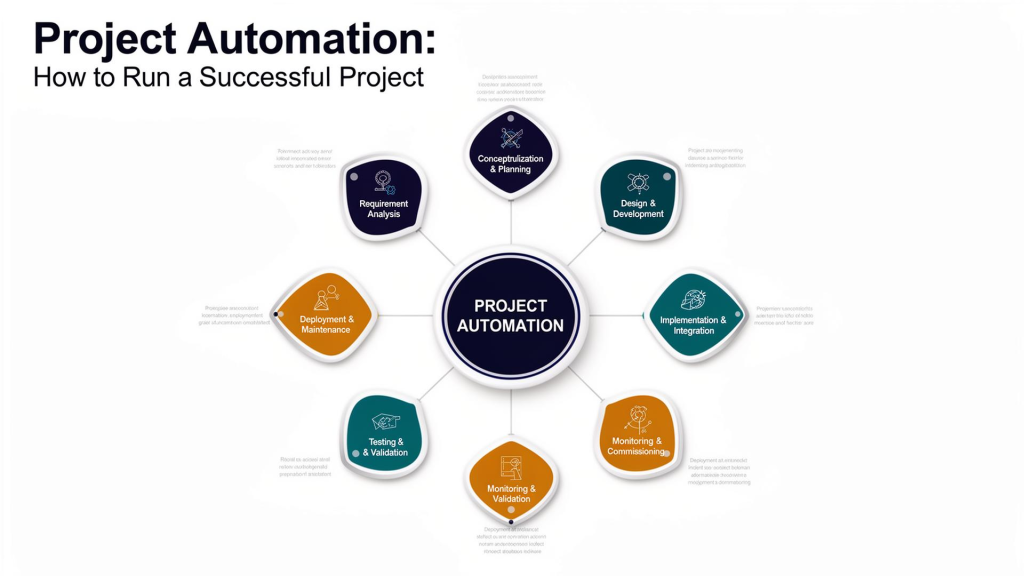
What Tools for Automation to Use for Each Project Stage
Different stages of a project benefit from different automation tools. Choosing the right type ensures smooth execution and scalability.
1. Conceptualisation and Planning
Tools:
Process modelling and documentation platforms (e.g. ADONIS, Lucidchart).
Purpose: Define workflows, roles, and dependencies before automation begins. Prevents fragile solutions built on unclear processes.
2. Requirement Analysisi
Tools: Collaboration and survey platforms (e.g. Miro, Confluence).
Purpose: Gather user requirements, identify pain points, and create specification documents. Ensures automation aligns with real needs.
3. Design and Development
Tools: Workflow engines and low‑code/no‑code platforms (e.g. Zapier, Power Automate).
Purpose: Build rule‑based workflows, integrate systems, and design automated task routing.
4. Implementation and Integration
Tools: Integration platforms and orchestration tools (e.g., MuleSoft, Make, Power Automate).
Purpose: Connect automation systems with existing IT infrastructure, ensuring smooth data flow.
5. Testing and Validation
Tools: Monitoring and validation tools (e.g. Selenium, TestRail).
Purpose: Verify workflows, catch exceptions, and ensure automation meets requirements.
6. Deployment and Commissioning
Tools: Project management automation platforms (e.g. Lark, Asana, Jira).
Purpose: Automate task creation, reminders, and reporting during rollout. Supports predictable delivery.
7. Monitoring and Maintenance
Tools: Governance and analytics platforms (e.g. Domo, Tableau, Sisense).
Purpose: Track performance, generate real‑time insights, and adapt workflows as needs evolve.
This article was written with the assistance of artificial intelligence as part of an internship project
Tanja Karonen's Commentary on the Article:
Reducing the administrative workload in project management is extremely important. Few people realize how much time project managers spend reviewing team members' timesheets, updating schedules, checking budgets, and handling all the administrative tasks that keep projects running. Fortunately, there are already many tools available to simplify this work, and new solutions continue to emerge. Power Automate, Zapier, Make, and n8n are good examples of platforms that can automate repetitive project activities such as sending reminders, creating tasks, managing approvals, updating project statuses, and transferring information between different systems. Perhaps the real question is not whether these tools exist, but whether the people responsible for these processes have the time to explore and implement them.
We need to genuinely involve people—the very people we work with every day. Together, we should agree on how automation will be implemented, establish shared ways of working, define data security practices, and develop common best practices.
It requires a clear plan, an appropriate budget, and patience. Artificial intelligence can accelerate many processes, but it does not eliminate the challenges of learning something new. Adopting new ways of working always takes time.



 Finnish
  English
Leave a Reply